An AI Agent That Diagnoses Solar Faults, and Refuses to Say “Healthy” When It Can’t Know
What I learned turning live solar telemetry into tools an AI agent can call
By Gopi Sri Krishna Yarlagadda, Lead Full Stack Engineer at Ascend Cargo · October 15, 2026 · Dallas, TX
Ask a solar site “is anything wrong?” and you get a surprisingly hard question. You need the node ID, the right
endpoint, to know that watts and wattHours are different questions, and then you read JSON.
I wanted to ask it in one sentence and get a diagnosis back. So I built solarnetwork-mcp, an MCP server
that turns SolarNetwork solar telemetry into tools an AI agent can call.
This is a personal project and it runs entirely on public data, so every number in this article can be checked against SolarNetwork’s own API. The part I am proudest of is not a detection algorithm. It is that the tool says “not assessed” when it cannot know.
The idea in one sentence
“Is anything wrong at node 1000? If output is down, tell me whether it’s weather or equipment.”
The agent discovers the site’s streams, picks a date range, runs the aggregation, compares each inverter against its siblings, and answers in plain English. The split of work is the whole design. The server does what a language model is bad at: request handling, pagination, unit semantics, and knowing which of nine streams is the weather sensor. The agent does what it is good at: deciding what to ask and explaining the answer.
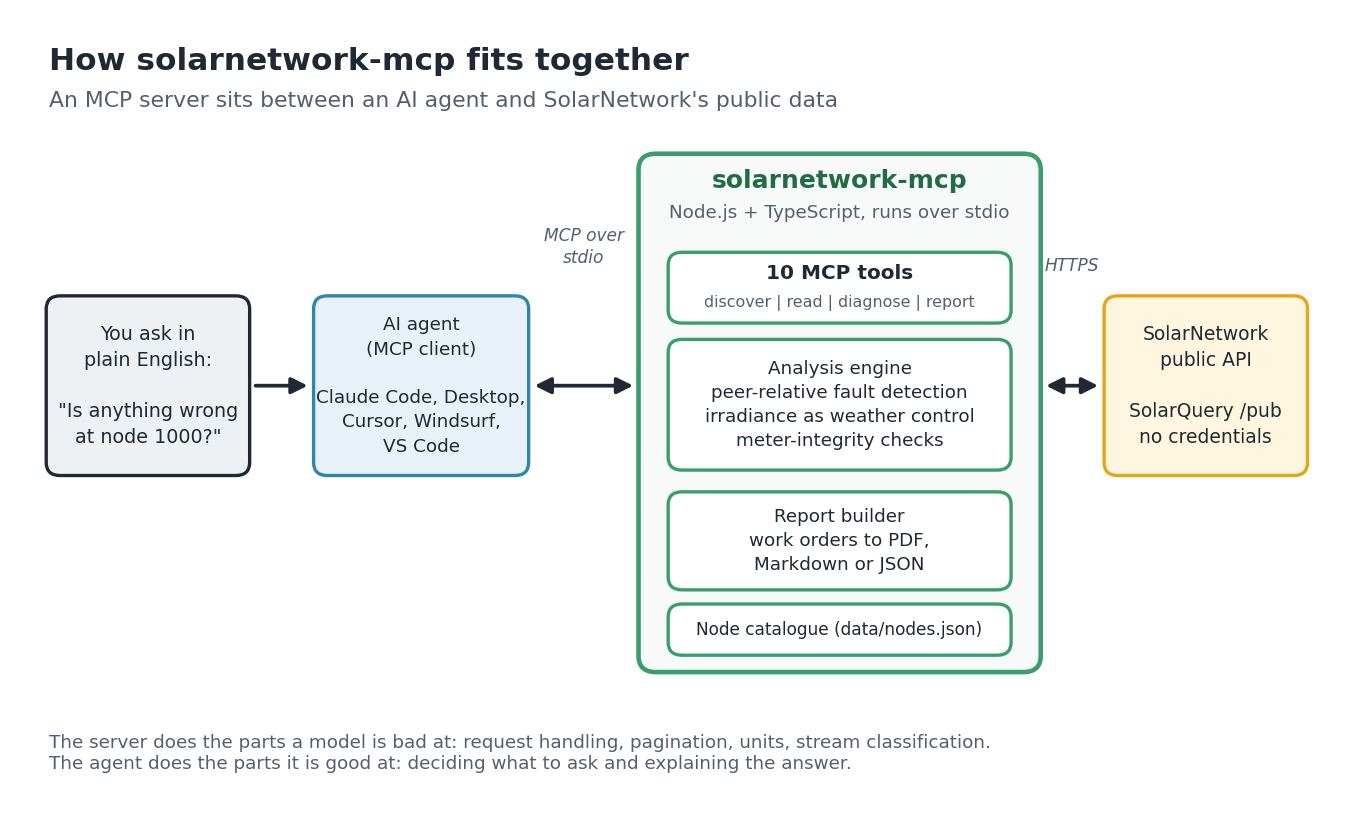
Real data, no credentials
SolarNetwork’s public endpoints publish data from 567 nodes, which I counted on October 15, 2026 by probing node IDs 1 to 5000. Of those, 336 have generation, inverter or irradiance streams that the server can classify, 288 of them reported in the last 24 hours, and 195 of those have two or more inverters, which is what fault detection needs. Many report every few minutes, and the core US fleet has nearly seven years of history.
The server exposes ten tools in four groups: discover, read, diagnose and report.
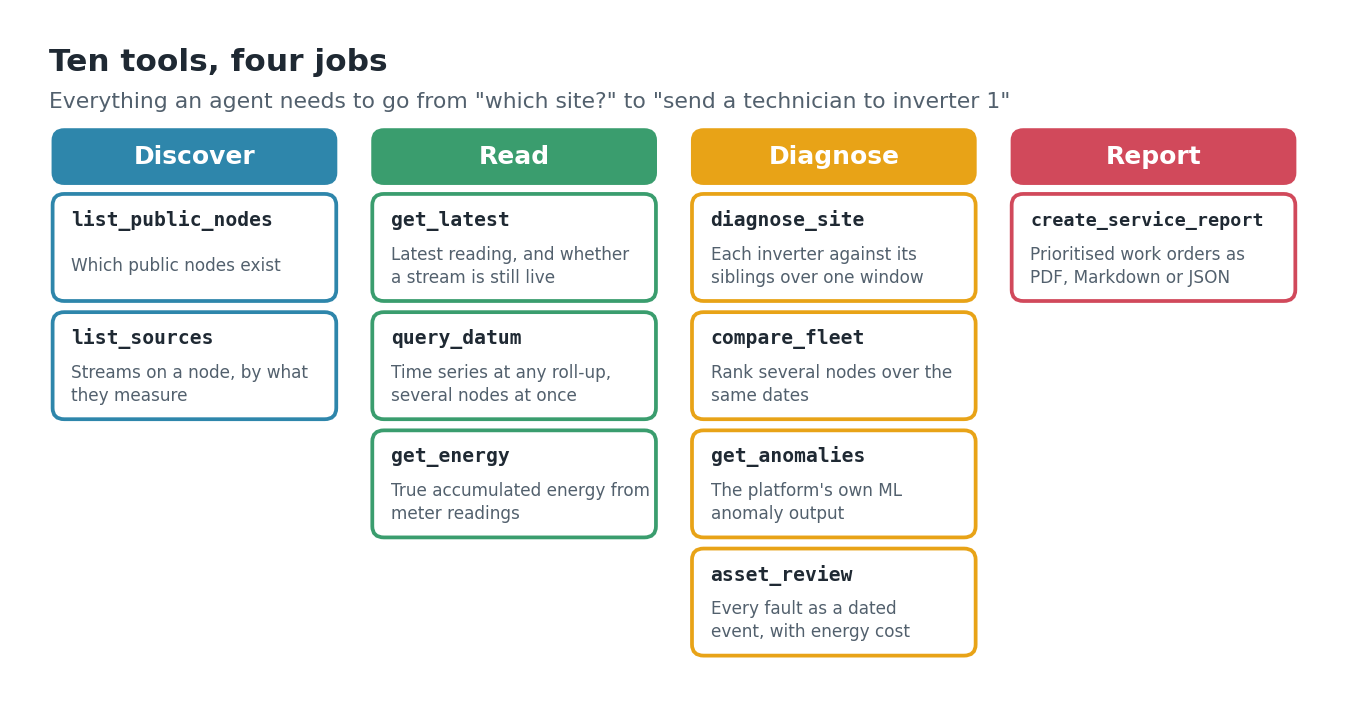
One detail matters more than it sounds. get_energy computes true accumulated energy from meter readings instead
of averaging power, because those two numbers answer different questions, and mixing them up is how dashboards quietly lie.
The hard part is not crying wolf
Detecting a fault is easy. Not raising false alarms is the work.
- Cloud cover must not look like a broken inverter. Detection is peer-relative: each inverter is compared with its siblings, so a passing cloud affects them all equally. Where a pyranometer exists, irradiance is used as a physical weather control.
- A fault already running when the window opens is labelled a lower bound. The tool never invents a start date it cannot see.
- “No faults found” is not the same as “healthy”. A site with fewer than two inverters has no peers to compare, so the tool reports it as “not assessed”.
- Meter counters reset. A reset silently corrupts every energy total that spans it, so the tool raises it as an event and never reports negative site energy.
A real example: node 1000
I ran an asset review on node 1000 for January 1 to September 1, 2026. It reported 10 events across 243 daily buckets, 6 of them still open at the end of the window, and an estimated 3,716 kWh not delivered, about 11.5% of what the site should have made. The findings:
- Inverter 1 produced nothing from May 17 to August 3: 79 days, while a sibling kept producing, so sunlight was available.
- Inverter 1 was already down when the window opened and stayed down until January 13, labelled “at least 13 days” because the real start is out of view.
- Inverters 2 and 3 both produced nothing from February 11 to February 15.
- Inverter 4 has reported 0 W on every bucket since March 25, 160 days, while its energy meter kept advancing by 7,887 kWh over the window.
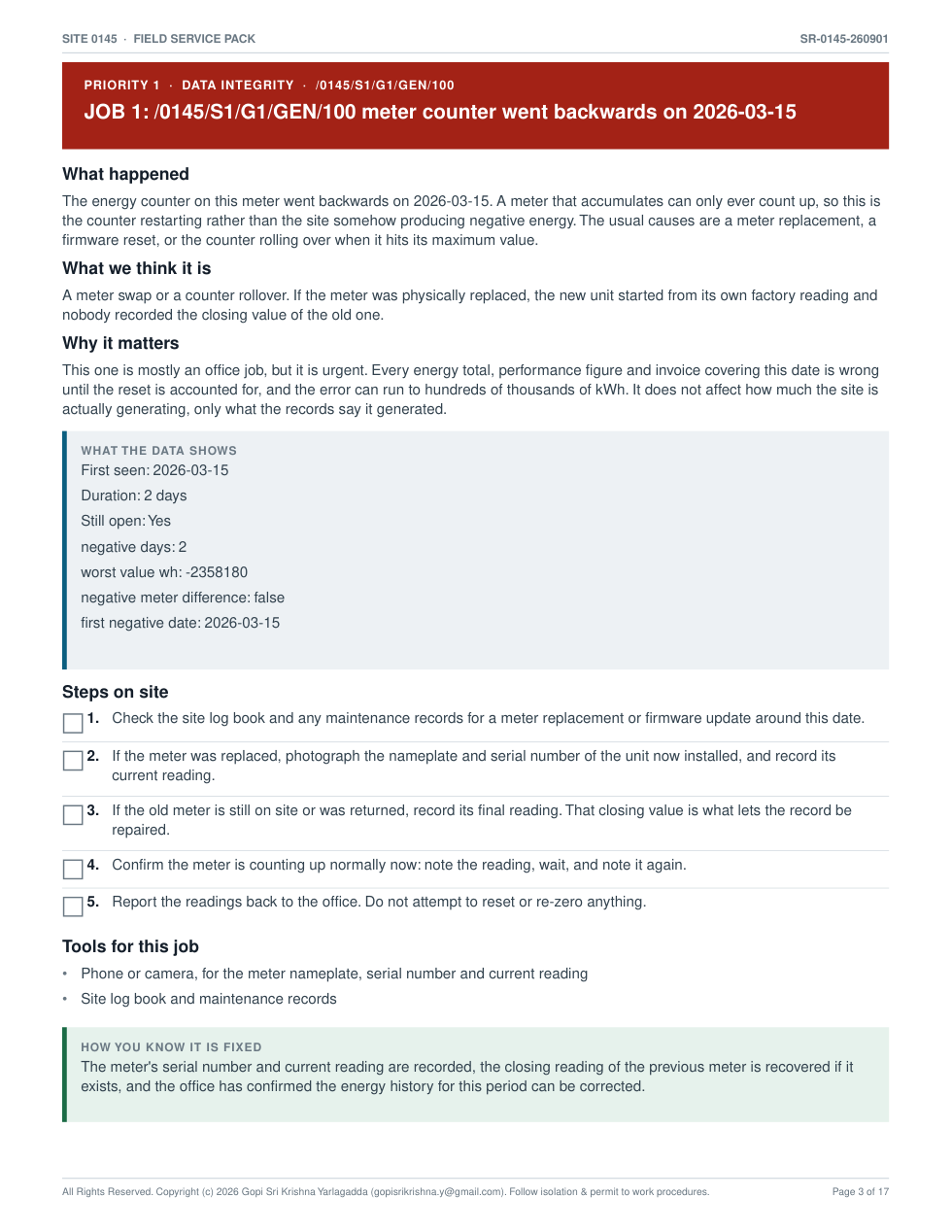
- The site meter and Inverter 1’s counter both ran backwards on March 15 (−2,358 kWh and −37 kWh), which is a counter reset or meter replacement.
- Three registered sources, GEN/101 to GEN/103, never returned a single bucket.
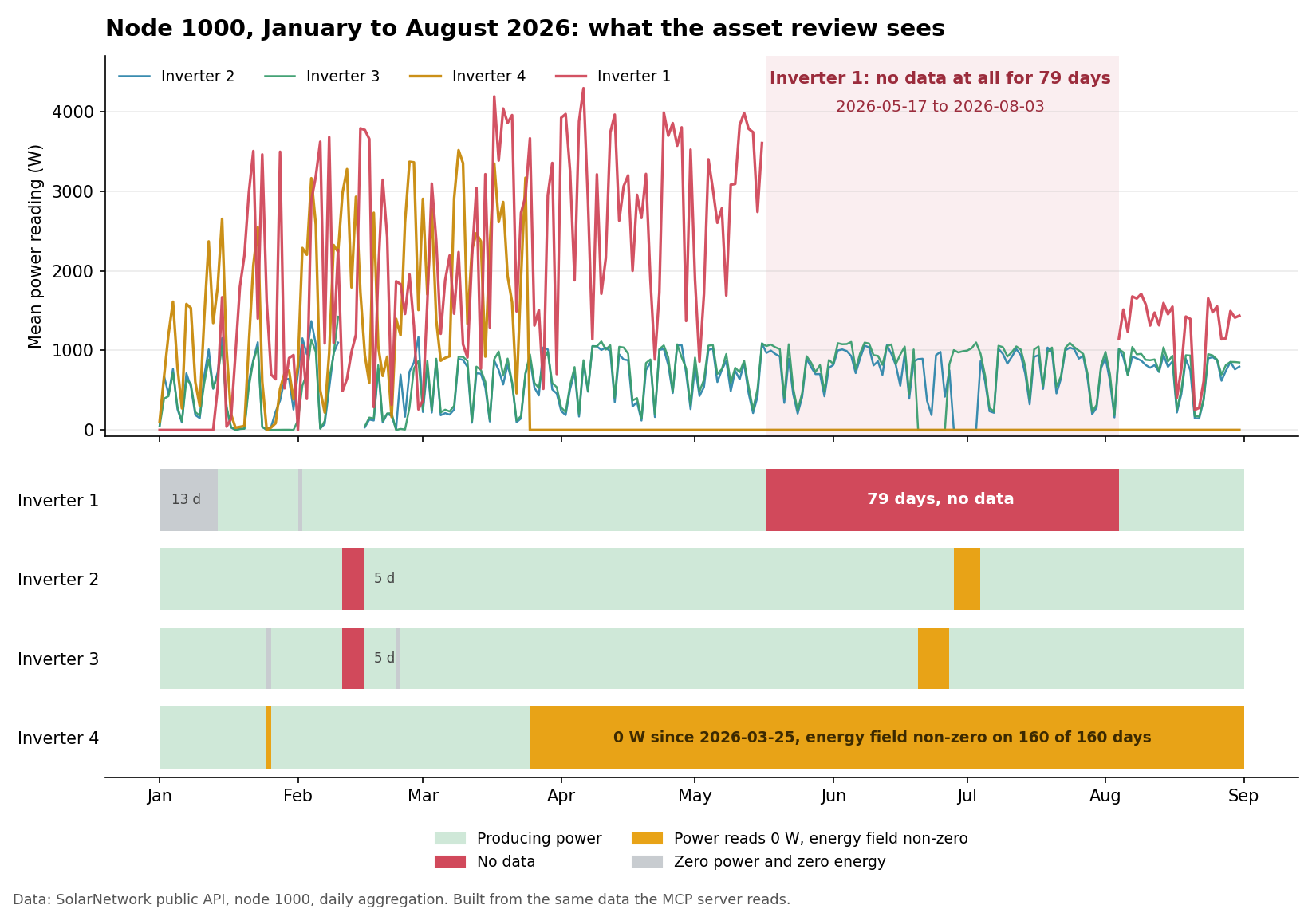
The two long faults look alike on a chart and are opposites in practice. Inverter 1 is genuinely out: it needs a technician. Inverter 4
looks dead because its power reads zero, but its energy field is non-zero on all 160 days, so the device is alive and only the power reading is lost.
That is a configuration fix, not a truck roll. A health check keyed on watts alone would page someone about a working inverter every night.
From diagnosis to a work order
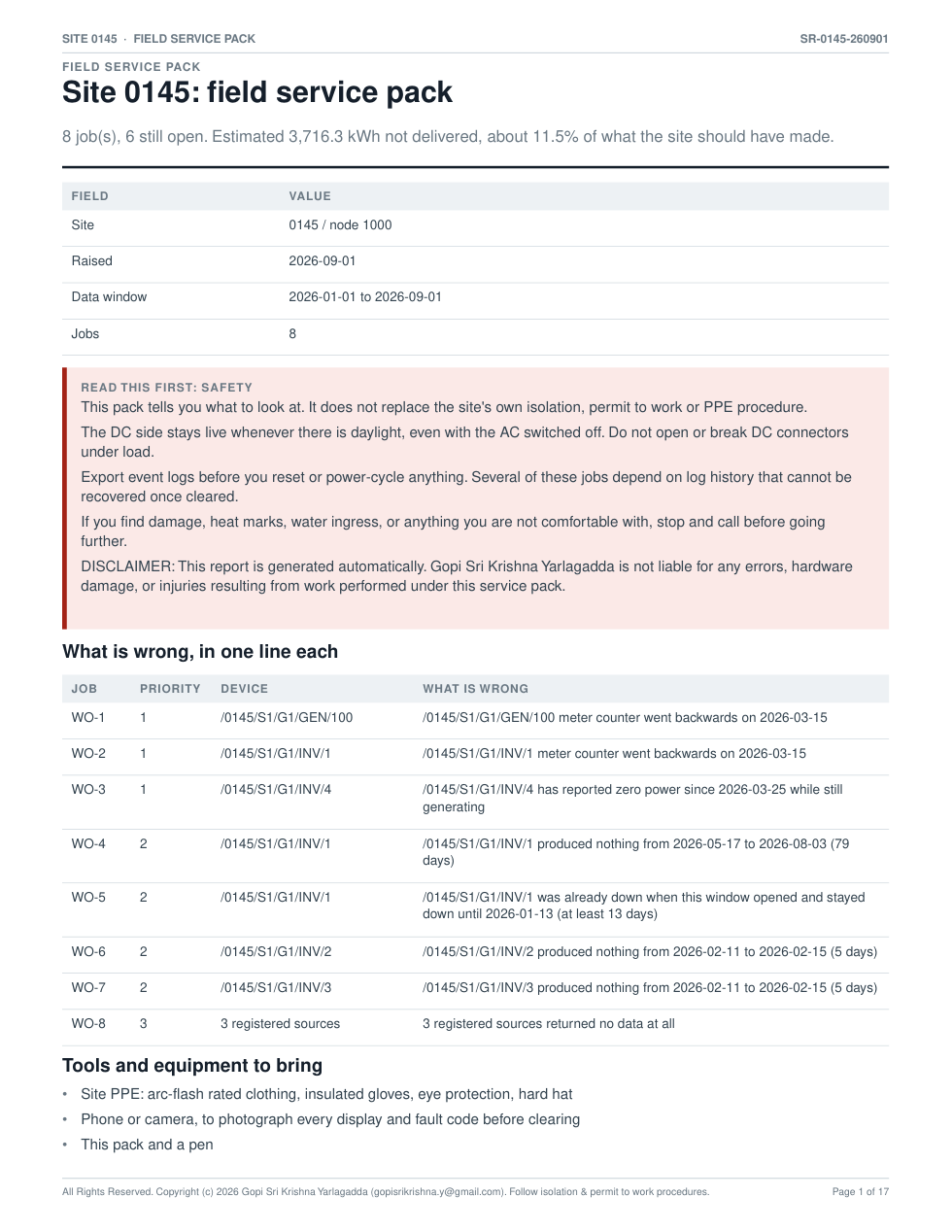
A finding is only useful if someone can act on it. create_service_report turns the review into prioritised jobs, each with a
plain-language cause, the evidence, numbered steps for site, the tools to bring and explicit sign-off criteria. For node 1000 it produced 8 jobs and a
17-page printable field pack, with tick boxes and a notes sheet. Everything is plain ASCII, so nothing turns into black boxes in a PDF or a ticketing system.
The same mistake, in my own data
This project taught me the lesson twice. My earlier scans of public node IDs counted only about 100 to 140 nodes. The real number was 556, and 567 today. Those scans mapped every non-OK HTTP response to “no such node”, collapsing four different outcomes into one. Permission denied (403) and rate limited (429) were both read as absent. Sampling 37 IDs the old scans called empty found 5 with real data, a 13.5% false-negative rate.
It is exactly the failure the tool is built to avoid: treating unknown as absent, or not assessed as healthy. A proper sweep of IDs 1 to 12000 classified every outcome separately: 556 public nodes with data, 197 public but never reporting, and 11,246 private.
Check it yourself
Because the data is public you do not have to take any of this on trust. This call returns the date range of node 1000 straight from SolarNetwork:
curl "https://data.solarnetwork.net/solarquery/api/v1/pub/range/interval?nodeId=1000"The project also ships 28 checks against fixed historical windows on live nodes. I ran them on October 15, 2026: 28 passed, 0 failed. Among them are the 79-day outage on node 1000, a counter reset pinpointed to June 3 on node 900, and a year of data that exceeds SolarQuery’s 1000-row page cap with every row still fetched. A failed check means either the server regressed or SolarNetwork restated history, and each one prints what it expected against what it got so you can tell which.
What it cannot do
- Sites with fewer than two inverters cannot be assessed, because peer comparison needs peers.
- Public nodes do not expose nameplate ratings, so loss figures are peer-scaled estimates, not warranty calculations.
- Fault detection runs on daily buckets, so a device silent for six hours is invisible.
- Stream classification depends on a path convention, so sites that name streams
MainorSMAInverter1come back unclassified.
What I took from building it
Give an agent a tool that is honest about its limits and the agent becomes honest too. An agent that can only hear “healthy” or “faulty” will invent certainty. One that can hear “I can’t know” will say so. The most useful behaviour in this project is a two-word status.
The source is viewable on GitHub: github.com/gopisrikrishna/solarnetwork-mcp. It is published with all rights reserved, so if you want to use or adapt any of it, please ask first.
Disclaimer. This is a personal project and these are my own opinions, not those of my employer, Ascend Cargo. It is not affiliated with, endorsed by or sponsored by SolarNetwork or its operators. Findings and loss figures are automated estimates from public data, not engineering advice, and they may be wrong or out of date. Nothing here replaces a site’s own isolation, permit-to-work or PPE procedures, and any field work must be done by qualified people. The software is provided “as is”, without warranty, and to the maximum extent permitted by law I am not liable for any use of it or of this article. © 2026 Gopi Sri Krishna Yarlagadda. All rights reserved.
About the author. Gopi Sri Krishna Yarlagadda is a Lead Full Stack Engineer at Ascend Cargo, building an AI-powered freight and logistics SaaS platform with agentic AI, RAG and MCP. Portfolio: gopisrikrishna.github.io/resume · LinkedIn: linkedin.com/in/gopisrikrishna · GitHub: github.com/gopisrikrishna